
Three Clicks to Analytics: Create Charts and Dashboards With Apache Superset
FormShare stores ODK submissions as relational repositories rather than JSON or XML blobs, which means analysis can start with a query instead of an export. This article explains how FormShare turns that architecture into working analytics in three steps: (1) enable the analytics module, (2) enable Superset analytics, and (3) log in. It covers the security model behind it and how access is granted and revoked automatically as project collaborations change, so nobody needs DBA or BI assistance.
Most Analytics Work Starts With an Export
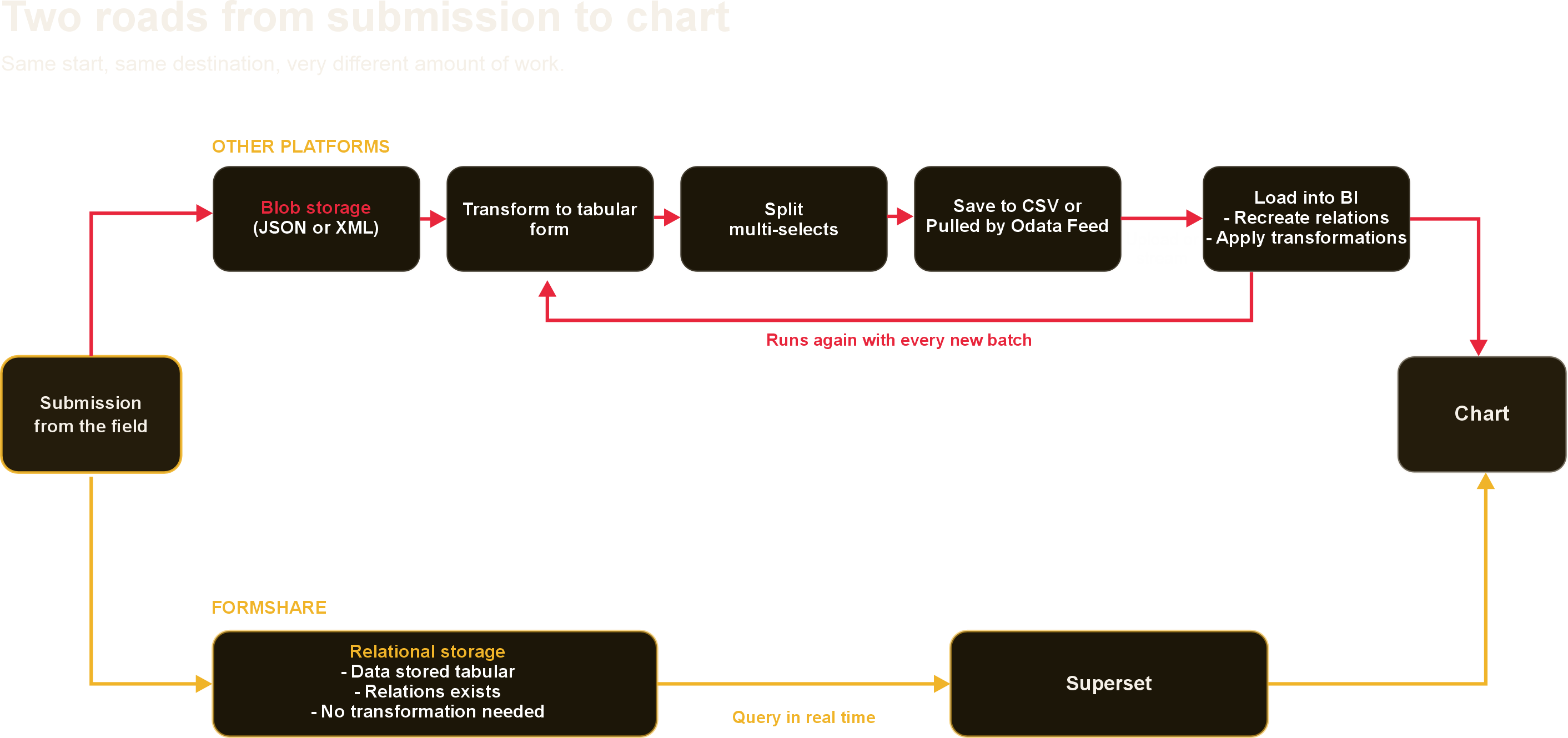
In most data collection platforms, analysis begins with a download. Someone exports a CSV, opens it in Excel or loads it into a BI tool, organizes the data, and rebuilds the relationships that the form already described before a chart can appear on the screen. Two weeks later, new submissions have arrived and the same work starts over if you don't have R or Python scripting knowledge.
FormShare stores submissions differently. Each ODK form becomes a relational repository with real tables, primary keys, repeats as linked child tables, and multi-select answers normalized into rows. We wrote about why that architecture matters in From Projects to Portfolio Intelligence. The practical consequence is simple: because the structure is already in the database, analysis does not have to start with an export. It can start with a query.
Three Steps From Submissions to Analytics
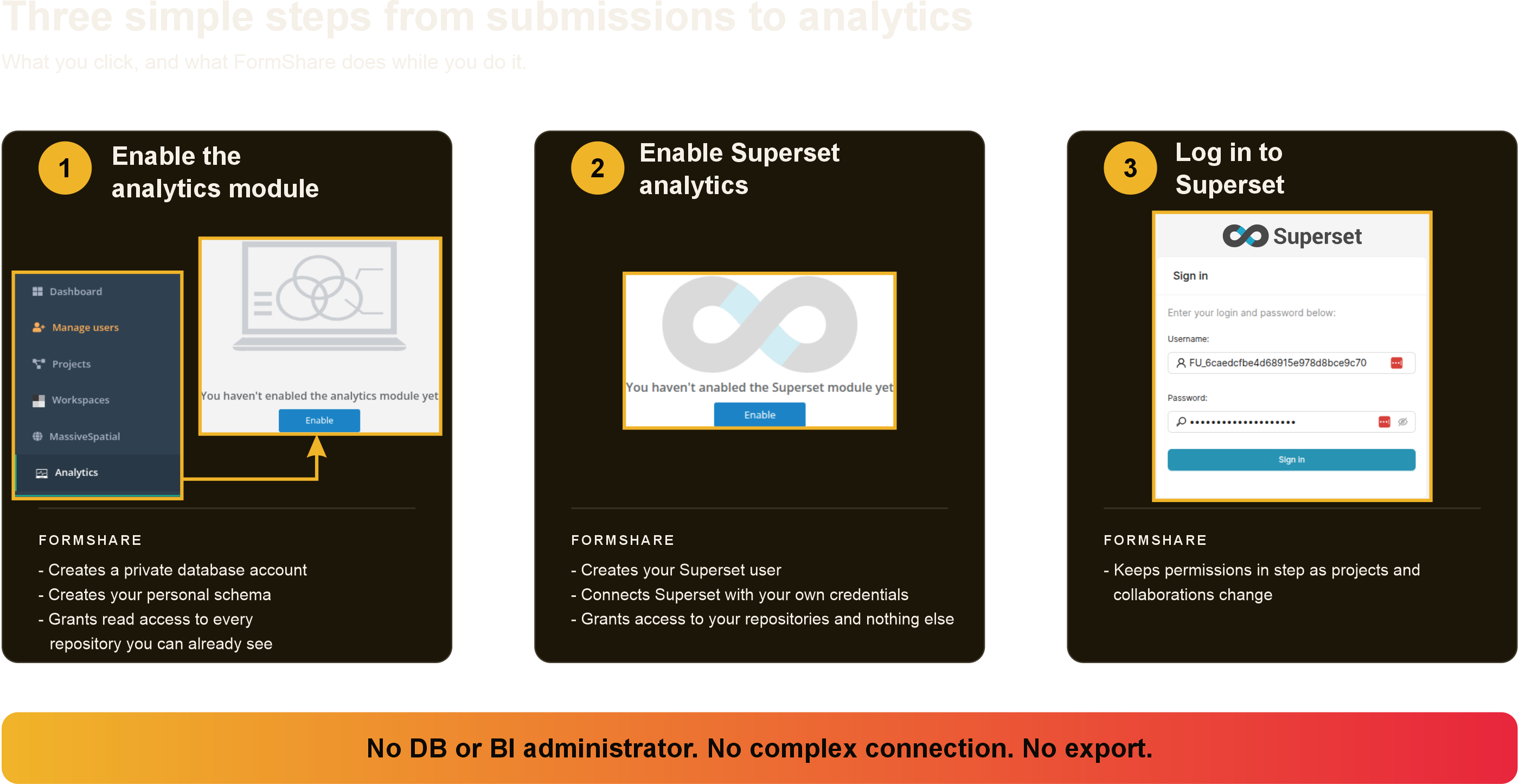
First, you enable the analytics module in your FormShare account. The account is given read access to every repository you can already see in FormShare: your own projects, and every project whose owner has invited you to collaborate.
Second, you enable Superset analytics. FormShare creates your Superset user, connects Superset to the database using your own credentials, builds the permissions so that the account sees your repositories and nothing else, and asks you to set your password before you start.
Third, you log in to Superset. Your repositories are already listed in SQL Lab. Write a query, save it as a chart, put the chart on a dashboard.
There is no ticket to a BI administrator and no DBA engineer needed for you to start. The whole setup is two buttons and a password.
Access That Follows Your Collaborations
Access management is where analytics projects usually stall. Data lives in one system, the BI tool in another, and somebody has to keep granting or revoking access as team changes.
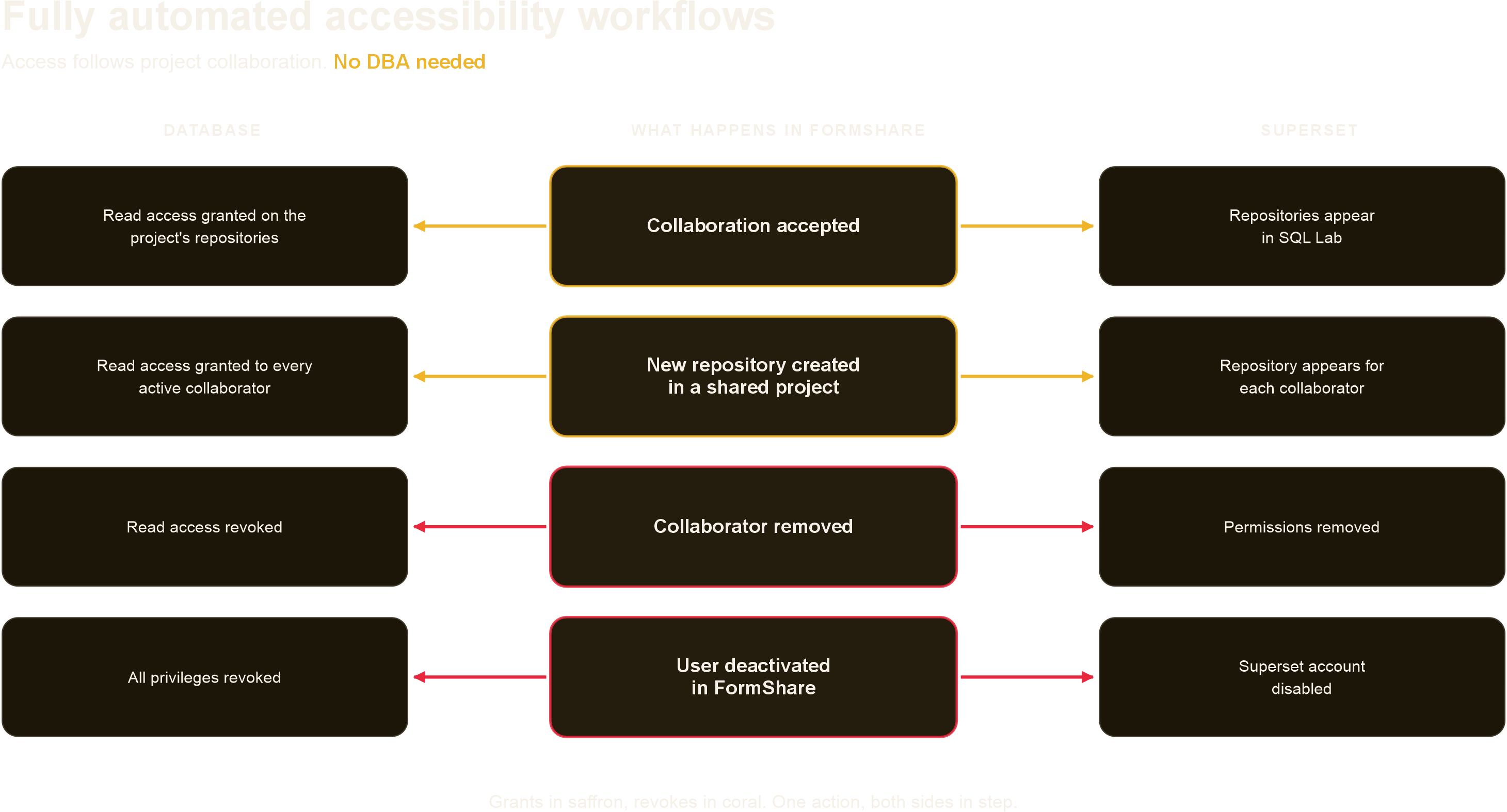
In FormShare, collaboration is project-based, and Superset access follows the same rule automatically. When you accept a collaboration, your database account is granted read access to that project's repositories and the matching permissions are added to your Superset account. When a new repository is created in a project you collaborate on, every active collaborator gets access as part of that process. When a project owner removes you as a collaborator, the database access and the Superset permissions are withdrawn together. When an account is deactivated in FormShare, the Superset account is deactivated with it. Delete a form or a project, and the permissions that pointed at it go too.
The people who already manage projects in FormShare are managing analytics access as a side effect of doing so.
The Data Does Not Move
Server-side SQL changes the economics of analysis. Queries run next to the data, so nothing has to be copied to a laptop or transferred to a cloud service for a chart to exist. That matters when submissions include protection cases, health records, GPS locations of households, or columns you have deliberately encrypted. It also matters on a slow connection, where a query over four years of submissions costs a few kilobytes instead of a download that fails at 80 percent.
Because every repository you can read is available through the same connection, a single query can join across them. Two forms in the same project. The same indicator from four country programs. A baseline against a follow-up round. And when the dashboard refreshes, it reads today's submissions rather than last Friday's extract.
Generate Insights and Impact at No Cost
Apache Superset is open source and we offer it on every SaaS plan. There is no per-seat cost, so the analyst who wants to better understand their data does not need a budget line to do it. It ships with dozens of visualization types, a proper SQL editor, geospatial charts, and dashboards with filters.
With FormShare you spend less on data management and more on Impact.
Apache Superset and the Superset logo are trademarks of the Apache Software Foundation. All product and company names mentioned are trademarks or registered trademarks of their respective owners. FormShare and QLands are not affiliated with, endorsed by, or sponsored by any of them. ODK is free and open-source software, getodk.org.